
Your smart manager for X growth.
Engagement groups, AI replies in your voice, Sorsa score boosting, smart follow and unfollow. Fourteen managers in one side panel, paced like a real person.
LAUNCH OFFER · 50% OFF Get lifetime access for $7 (was $14) · one-time payment
- Runs in your browser
- AI replies in your voice
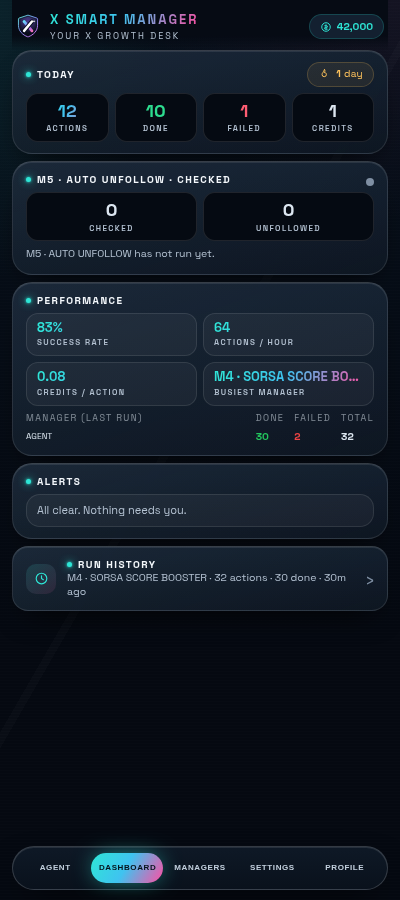
- Live dashboard
- Paced with delays & breaks
- Lifetime $7 · launch offer
Fourteen managers.
One calm panel.
Each manager has its own delays and breaks, a visible “How it works”, and a Start button that turns into Stop right where you pressed it.
Engagement Groups
Telegram rooms where people swap engagement on X. Tap a room to join: some open at once, others need a quick DM to the owner.
Swap rooms on Telegram
DetailsLink Target Engagement
Paste X post links, many at once. Each one is liked (if on) and replied to, in order. Misses go to a Missed list.
Like & reply to links
DetailsTelegram Group Scroll
Works through a Telegram group's X links on its own, link by link, in order: like and reply.
Telegram group links
DetailsSorsa Score Booster
Pick All, My List or Default. Each profile: like the 2 newest posts, reply to the newest, follow. Progress is saved per list.
Like, reply, follow
DetailsAuto Unfollow
Opens your Following list and unfollows accounts that don't follow you back, one at a time, with a Keep list that is never touched.
Drop non-followers
DetailsGroup Like
Open any X feed (timeline, list, search or a profile) and tap Start. It scrolls and likes posts one by one.
Like any feed
DetailsAudience Magnet Builders
Finds busy posts, then likes, replies to and follows the people replying to them. Grow your followers, steadily.
Engage busy repliers
DetailsFeed Hunter and Scroll
Scrolls your Home feed or your own search like a real person, liking and replying as it goes, skipping some posts so it never looks automatic.
Scroll, like & reply
DetailsGrow Followers
Save X List links, pick one and tap Start. It replies to fresh posts from the last 4 hours, one after another, with breaks built in.
Reply on your X Lists
DetailsSmart Reply Back
Add your own post links. It opens each post, likes every comment and replies to each one.
Answer your comments
DetailsAuto Follow
Add one profile and follow its followers from the bottom up, one checked follow at a time, using only the profile's own Follow button. Stops on rate limits.
Rate-limit safe follows
DetailsVoice Clone
Paste 8 to 15 of your own tweets. Replies copy your style, never your words.
Replies in your style
DetailsPost Generator Studio
Paste a post or notes and get a fresh post or thread with the same ideas in new words. Nothing posts until you do.
AI posts & threads
DetailsFavorite Creator Circle
Save the accounts you engage with most so they're one tap away, without searching for them each time.
Creators, one tap away
DetailsRunning in three steps
- 01
Install
Add X SMART MANAGER to Chrome and open the side panel next to x.com.
- 02
Make it yours
Enter your access key, set your tone, word limit and Voice Clone samples.
- 03
Press Start
Pick a manager and tap Start. Watch actions, credits and alerts live on the dashboard.
Pay once. Keep it forever.
No subscription. Credits only for the AI replies you actually use.
Early-bird price for our first users. Lock in lifetime access at $7 before it goes back to $14.
- All 14 managers
- Dashboard, alerts and run history
- Saved progress and Draft Folders
- Voice Clone and Post Generator Studio
- Lifetime access, no subscription
AI replies
AI replies use credits. Your live balance sits in the header, with a full credit history one tap away. Top up from the Buy page whenever you need more.
- Pay only for what you use
- Live balance in the panel
- Full credit history
Bring a friend.
You both earn.
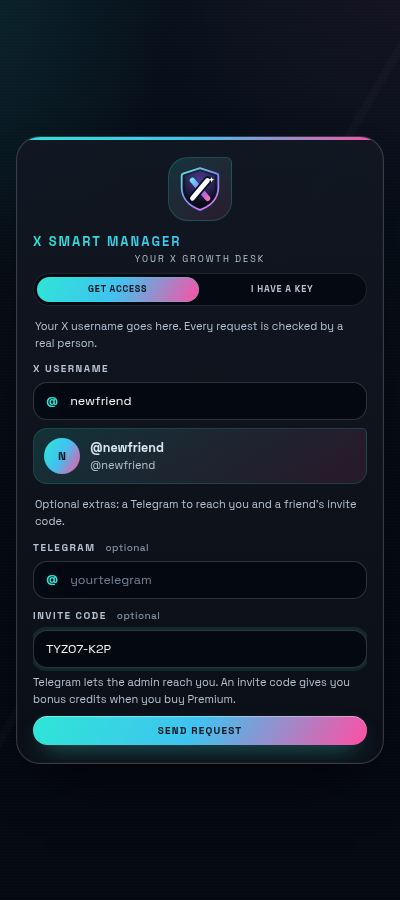
Share your invite code. Once your friend buys Premium and the payment is approved, credits land in both accounts — once per friend.
Questions, answered.
What is X SMART MANAGER?
A Chrome extension that opens as a side panel next to x.com. It runs 14 managers for engagement, replies, follows, unfollows and writing, with a live dashboard showing what happened.
Where can I install it?
The Chrome Web Store listing is on its way. The Add to Chrome buttons on this page will point to it as soon as it is live.
Does it work on mobile?
Yes, in Android Chromium browsers that support extensions, such as Kiwi and Mises. There it opens as a full page, and during a run a small floating dashboard shows on x.com.
How much does it cost?
Premium is a one-time payment for lifetime access, with no subscription. During our launch offer it is $7 instead of the regular $14 (50% off) — an early-bird price for our first users. Lock in lifetime access at $7 before it goes back to $14. AI replies use credits; your balance and full credit history are always visible in the extension.
How do invite rewards work?
Share your invite code. When your friend buys Premium and the payment is approved, you get 3,000 credits and they get 500. Each invited friend counts once.
Will replies sound like a bot?
You set your tone and a word limit (10 words by default), and Voice Clone learns your style from your own tweets. Every reply is written fresh, and it never comments twice on the same post.
Is automation on X risky?
Every action is paced with delays and breaks, and Auto Follow stops on rate limits. Still, any automation carries some risk, so keep settings moderate and follow X's rules.
Grow smarter on X,
starting today.
One side panel. Fourteen managers. Get lifetime access for $7 (was $14) — launch offer.